
For most of the last decade, “using AI” meant typing a question and reading an answer. You asked, the model replied, and the loop ended there. That model of interaction is now being replaced by something far more capable — and far more demanding to engineer well. AI agents don’t just answer; they act. They plan, use tools, make decisions across many steps, and carry tasks through to completion with limited human input.
At Radiant Code & Connect, building AI agents, RAG systems, and intelligent business applications is the core of what we do. This guide distills what we’ve learned: what these systems actually are, where they create real value, where they still fall short, and how to deploy them without getting burned.
From Chatbots to Agents
A traditional language model is reactive. It takes an input and produces an output in a single pass. Useful, but limited — it can tell you how to do something, but it won’t do it.
An AI agent adds three ingredients on top of that core intelligence:
- Goals. Instead of a one-off prompt, the agent is given an objective: “Research these five competitors and summarise their pricing,” or “Triage incoming support tickets and draft responses.”
- Tools. The agent can reach beyond text — searching the web, querying a database, calling an API, sending an email, running code, or editing a file.
- A loop. This is the defining difference. The agent observes the result of each action, reasons about what to do next, takes another action, and repeats until the goal is met or it decides it’s stuck.
That loop is what turns a clever text generator into something that can genuinely get work done.
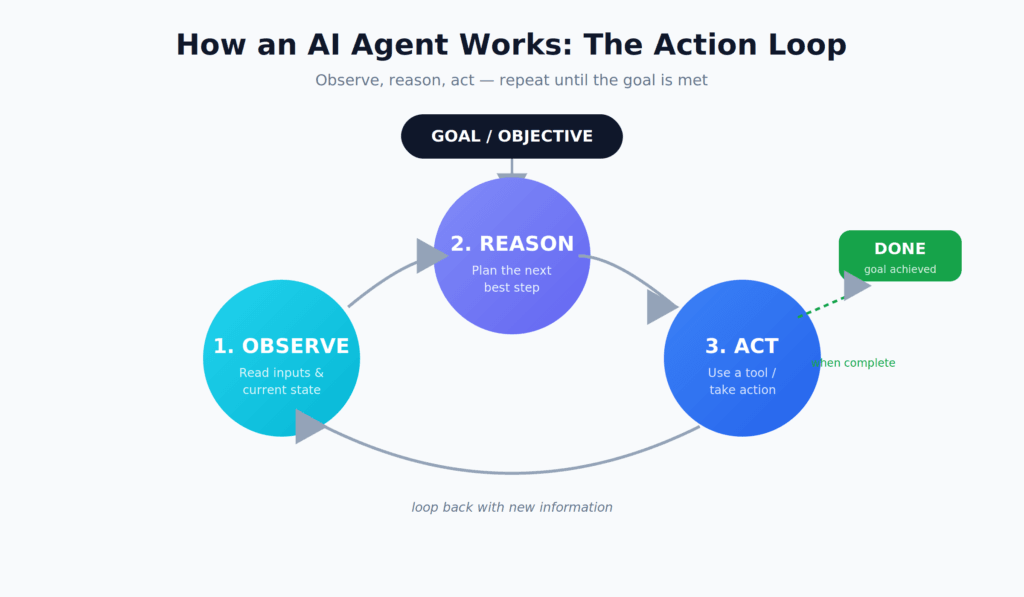
 The agent action loop: observe the current state, reason about the next step, act using a tool, then repeat with new information until the goal is achieved.
What “Autonomous Workflow” Actually Means
An autonomous workflow is a sequence of tasks an agent — or a coordinated team of agents — carries out with minimal human supervision. The word autonomous is doing a lot of work here, and in practice it sits on a spectrum rather than functioning as an on/off switch.
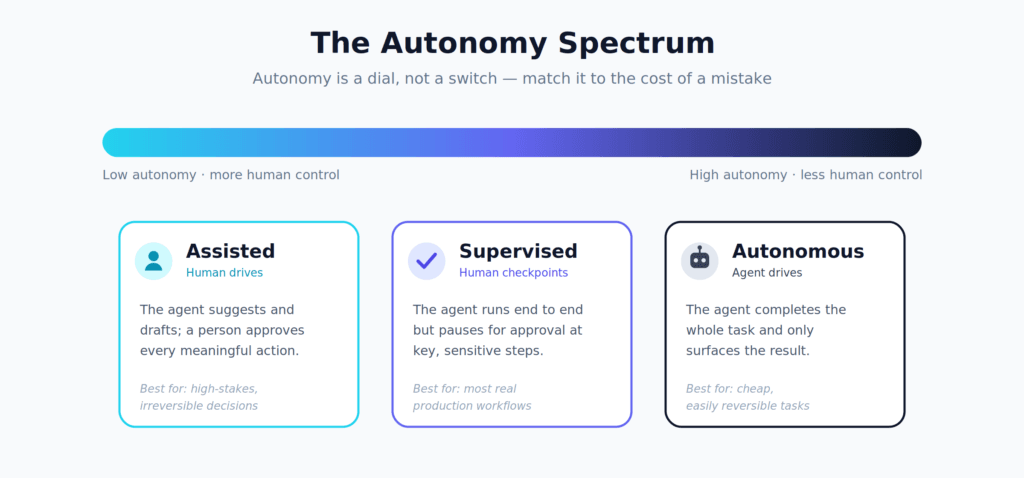
Autonomy is a dial, not a switch. The right setting depends on how costly and reversible a mistake would be.
Most production systems we build for clients deliberately live in the middle — supervised autonomy. The agent runs end to end but pauses for human approval before consequential actions: spending money, sending external communications, or making irreversible changes. Deciding which actions to automate and which deserve a human checkpoint is the single most important design decision in any agentic system. Getting that boundary right matters far more than maximizing autonomy for its own sake.
Agentic Workflows vs. Traditional Automation
Businesses have automated processes for years with scripts, RPA, and rule engines. So what’s genuinely new? The difference comes down to how each handles ambiguity and change.
| Traditional Automation | Agentic Workflow | |
|---|---|---|
| Logic | Fixed if-then rules | Reasons about each situation |
| Unstructured input | Breaks or needs a new rule | Interprets and adapts |
| Edge cases | Fails or escalates blindly | Handles, or escalates with context |
| Maintenance | Re-coded for every change | Adjusts via instructions/goals |
| Best for | High-volume, identical tasks | Variable, judgment-heavy tasks |
Traditional automation is brilliant when every input looks the same. Agents earn their place precisely where inputs don’t — the messy, long-tail variation that rule-based systems never handled gracefully.
A Concrete Example
Consider a workflow for handling customer refund requests. A rule-based automation would follow rigid templates and break the moment a request didn’t fit. An agent-based workflow handles it differently:
- It reads the incoming message and understands the customer’s actual intent, even when phrased awkwardly.
- It pulls the order history from your database to verify purchase date and refund eligibility.
- It applies your refund policy — including the judgment calls the policy leaves open.
- It drafts a response in your brand’s tone.
- For routine cases, it processes the refund automatically. For edge cases — an unusually large amount, a repeat requester, an ambiguous policy fit — it escalates to a human with a summary and a recommendation.
The result isn’t just faster. It’s a system that absorbs the real-world variation that traditional automation could never cover.
Where Agents Are Already Earning Their Keep
The most successful early deployments share a profile: tasks that are tedious, rules-based but with judgment, and repeated at volume. The areas seeing the strongest traction:
Software development. Agents read codebases, write and test functions, fix bugs, and open pull requests. Teams increasingly delegate well-scoped tasks and review the output rather than writing every line by hand.
Research and analysis. Gathering information from many sources, cross-checking it, and synthesizing a structured summary is exactly the kind of multi-step, tool-using task agents excel at — especially when paired with a RAG system grounded in your own documents.
Operations and back office. Data entry, reconciliation, report generation, and routing requests across systems — the connective tissue of most organizations — are ripe for agentic handling.
Customer support. As in the refund example above, agents triage, draft, and resolve a large share of inquiries while routing the genuinely hard ones to people.
The Honest Limitations
Anyone selling fully hands-off autonomy is overselling. Today’s agents have real, well-documented weaknesses, and pretending otherwise leads to expensive mistakes. As practitioners, we’d rather you hear this up front:
- They can be confidently wrong. An agent can pursue a flawed plan with complete conviction. Without checkpoints, a small early error compounds across many steps.
- Long-horizon reliability is hard. A three-step task may succeed reliably; a thirty-step task multiplies the chance that something goes wrong somewhere. Reliability tends to degrade as task length and autonomy increase.
- They need guardrails. An agent with access to your tools can also misuse them. Permissions, spending limits, and approval gates aren’t extras — they’re core architecture.
- Cost and latency add up. Each loop step is a separate computation. Workflows that loop many times, or run many agents in parallel, can get slow and expensive without careful design.
None of these are reasons to avoid agents. They’re reasons to deploy them thoughtfully.
How to Deploy Agents Without Getting Burned
Across the projects we’ve delivered, a handful of principles consistently separate the systems that succeed from the ones that quietly get shelved:
Start narrow. Pick a single, well-bounded task with a clear definition of success rather than trying to automate an entire department. One workflow that reliably does one thing beats an ambitious one that does ten things unreliably.
Keep a human in the loop where it counts. Require approval where a mistake is costly or hard to reverse. Automate freely where mistakes are cheap and easily undone.
Make everything observable. You should be able to see what the agent did, why, and where it went wrong. Step-by-step logging isn’t just for debugging — it’s how trust is built over time.
Measure against a baseline. Compare the agent’s output to how the task is done today, on accuracy, speed, and cost. “Feels impressive” is not a metric.
Design for failure. Assume the agent will occasionally get things wrong, and build the workflow so failures are caught, contained, and recoverable — never silent and catastrophic.
Where This Is Heading
The trajectory is clear even if the timeline isn’t. Agents are getting better at long-horizon planning, more reliable with tools, and cheaper to run. We’re moving toward workflows where multiple specialized agents collaborate — one researches, one writes, one reviews — coordinated like a small team. Increasingly, the interface to software will be a goal you state rather than a sequence of buttons you click.
But the organizations that benefit most won’t be the ones that hand everything over overnight. They’ll be the ones that find the right division of labor between human judgment and machine execution — automating the repetitive and the tedious while keeping people firmly in charge of the consequential.
Frequently Asked Questions
What’s the difference between an AI agent and a chatbot? A chatbot responds to messages. An agent pursues a goal — it plans, uses tools, takes actions, and iterates until the task is complete.
Are autonomous workflows safe for business use? Yes, when designed with the right guardrails: human approval for high-stakes actions, scoped permissions, spending limits, and full logging. Safety comes from the system design, not from the model alone.
Do I need to replace my existing automation? Not at all. Rule-based automation remains ideal for high-volume, identical tasks. Agents complement it by handling the variable, judgment-heavy work that rules can’t.
How do I get started? Begin with one well-defined, repetitive task that involves some judgment, and where mistakes are cheap to reverse. Prove value there, then expand.
Ready to Put AI Agents to Work?
At Radiant Code & Connect, we design and build production-grade AI agents, RAG systems, and autonomous workflows tailored to your business — with the guardrails, observability, and human-in-the-loop controls that make them safe to rely on.
Book an AI Consultation or explore our AI solutions to see what an autonomous workflow could do for your team.